sell content online · Nov 01, 2026
Sell Content Online: A Practical 2026 Guide
What decides whether a paid post pays, the format readers talk about most, or what a publisher keeps after fees and whether the customer list can move to another host? The practical answer is the second question. To sell content online, a publisher picks one repeatable offer, usually a membership, p
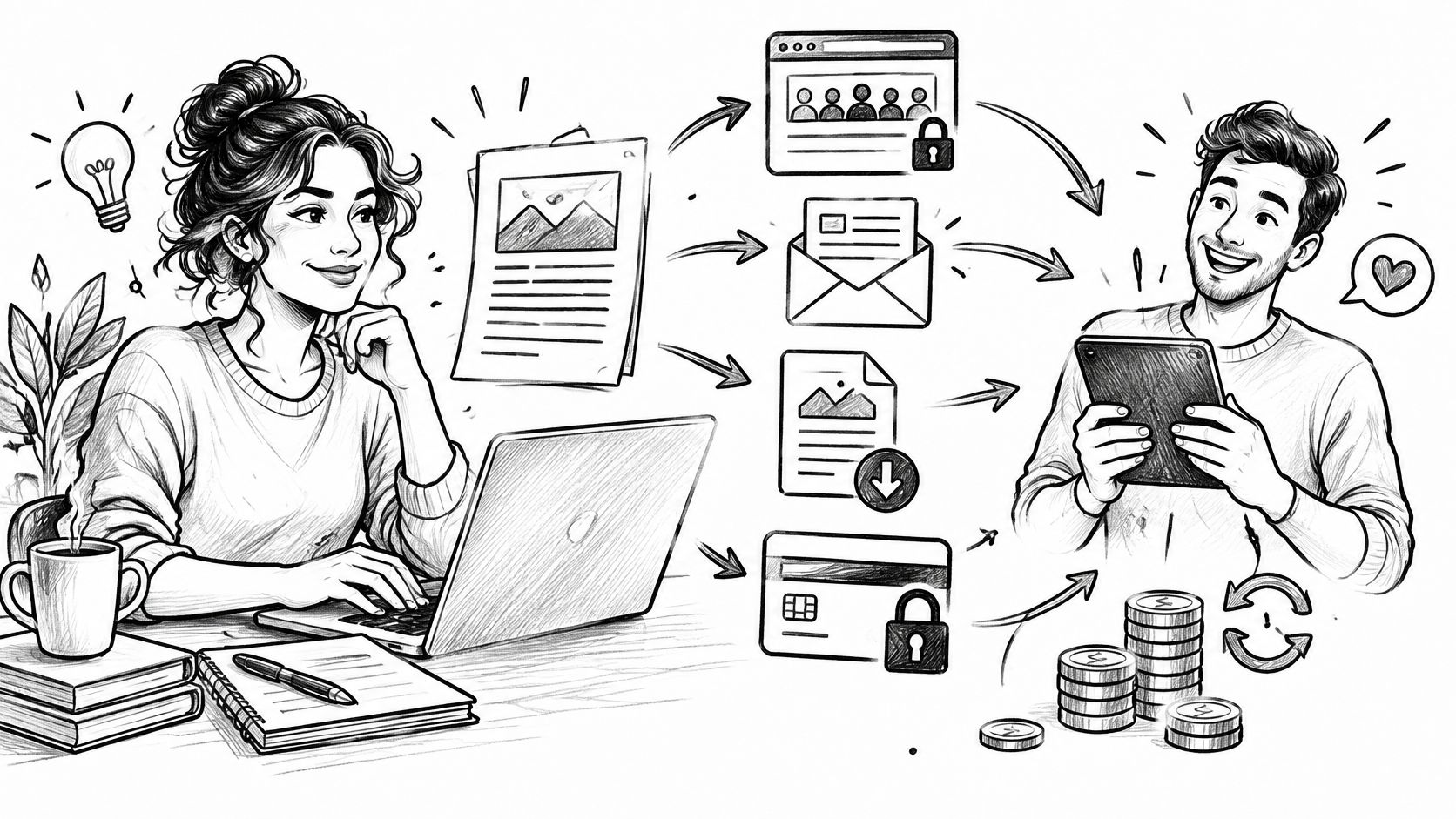
What decides whether a paid post pays, the format readers talk about most, or what a publisher keeps after fees and whether the customer list can move to another host? The practical answer is the second question. To sell content online, a publisher picks one repeatable offer, usually a membership, paywalled post, paid newsletter, or digital file, prices it after processing costs, and sells it to readers whose email addresses stay under the publisher's control.
Table of Contents
Ways to Sell Content Online
A reader pays for access that can be delivered again without recreating the work. That access might be a library, one research essay, a recurring newsletter edition, a finished file, or a sequence of lessons. The format should match how readers already use the publication, not what happens to be fashionable.
Paid Content Formats and Example Prices
Format | Buyer pays for | Example price | Fits when |
|---|---|---|---|
Monthly membership | Ongoing library or community access | $5 to $15 per month | A back catalog people reread |
Annual membership | Same access, paid once a year | About 10 times the monthly price | Readers who already trust the work |
Paywalled post | One full essay or report | $5 to $20 one time | A single strong piece, not a series |
Paid newsletter | Recurring editions, often tiered | $5 to $12 per month | A clear beat sent on a schedule |
Digital download | PDF, template, audio, or video file | $9 to $49 one time | A finished asset with a narrow job |
Short course | A lesson sequence with an end | $49 to $199 one time | Teaching that shouldn't be a forever membership |
A monthly membership suits a blog people return to because each new post makes the existing library more useful. An annual option near ten times the monthly fee gives committed readers a discount while giving the publisher cash earlier. It also reduces monthly card failures, although it creates a larger refund if a buyer changes their mind.
A paywalled essay works differently. It suits one piece built from original research, a local investigation, or a detailed buying guide. It doesn't require the writer to promise another edition next week. That's a better first test than a membership when the archive is thin.
A paid newsletter fits a repeating beat, such as a weekly market note, planning guide, or industry briefing. It can sit inside a membership tier so readers aren't sent through two checkouts. A download suits a finished asset with one narrow job, such as a template, checklist, spreadsheet, or audio lesson. A short course suits teaching with a clear finish. It needs sequencing, progress, and some way to show completion, and readers deciding whether a course also needs formal learning tools can use UI Lib's guide to choosing an LMS to compare those requirements before paying for extra software.
Practical rule: Sell the format readers already ask for by name. Don't build a course to avoid the simpler job of gating a strong post.
A Small-List Example
Say a writer has about 800 free subscribers and a weekly letter. A paid tier is the sensible first offer because the publishing habit and audience already exist. A course would add recording, sequencing, and support before proving that readers will pay for one more edition. A how-to on selling courses and downloads from a blog becomes useful later, once paid demand is clear.
Scale doesn't remove that discipline. Goldman Sachs Research estimated the creator economy at approximately $250 billion in 2023, projected to reach about $480 billion by 2027, while only about 4% of global creators were classified as professionals earning more than $100,000 annually and brand deals represented approximately 70% of creator revenue in the survey data it cited. Direct sales can complement sponsorships, but they don't guarantee professional income. Circle one row before opening a payment tool.
Pricing and Fees That Leave You More
How much of a $10 membership payment reaches you after fees? The answer depends on both the payment processor and the platform, and on whether the rest of your publishing tools are already covered.
For example, if processing takes $0.59 from a $10 payment, you keep $9.41 before any platform fee. A platform that also takes 10% of the sale deducts another $1, leaving $8.41. That difference repeats with each payment.
What a Paid Subscription Leaves After Software and Platform Fees
Setup | Software cost | Cut of sales | Cheaper when |
|---|---|---|---|
Card processing only | No added platform fee | Processor fee applies | Your site and email tools are already paid for |
Substack paid subscriptions | No fixed software bill | Percentage cut plus card processing | Paid revenue is low enough that the percentage cut costs less than a flat monthly bill |
Ghost(Pro) | Flat monthly software bill | No platform percentage, plus card processing | You want a hosted site and memberships without a revenue-based platform cut |
Beehiiv | Flat monthly software bill | No platform percentage, plus card processing | Its newsletter features fit your needs and justify the monthly bill |
The trade-off is between a fixed bill and a percentage of sales. With a percentage fee, the cost rises as paid revenue grows. A flat software bill stays the same, but can be a poor fit before you have enough paying members to cover it. Compare the full setup, not just its headline fee.
The same calculation applies beyond newsletters. A video course seller can review training video platform costs against expected enrollment, rather than choosing by feature count alone. A low monthly price can still cost more once separate tools are added.
Count the Members That Cover the Bill
Divide the monthly software cost by the amount you keep from each member. If a $10 payment leaves $9.41 after processing, a $29 monthly bill takes about four members to cover. That calculation excludes your time, support, and any lost revenue from cancellations.
Price renewals clearly:
Annual plan: Set the annual price so readers can see the savings compared with paying monthly.
Founder rate: Define who qualifies and whether the rate lasts while the membership stays active.
Refund rule: State the refund window and process before checkout opens.
Tier names: Describe each tier by its benefit. This guide to tiered pricing for a blog can help you structure the options.
A lower platform cut can still cost more if email delivery, memberships, and SEO tools come as separate bills. VeloCMS combines blogging, newsletters, memberships, and site theming in one subscription, with a 0% platform commission; payment processing fees still apply.
Add up the site, newsletter delivery, payment processing, membership tools, and any other services the offer needs. Then write down the price buyers will pay and the member count needed to cover those recurring costs.
How to Launch a Paid Content Offer
A small offer can be launched over a weekend if the work stays narrow. The point isn't speed for its own sake. A short launch prevents a publisher from building a course, community, and three tiers before one stranger has paid.
The infographic below summarizes the order before the detailed steps.
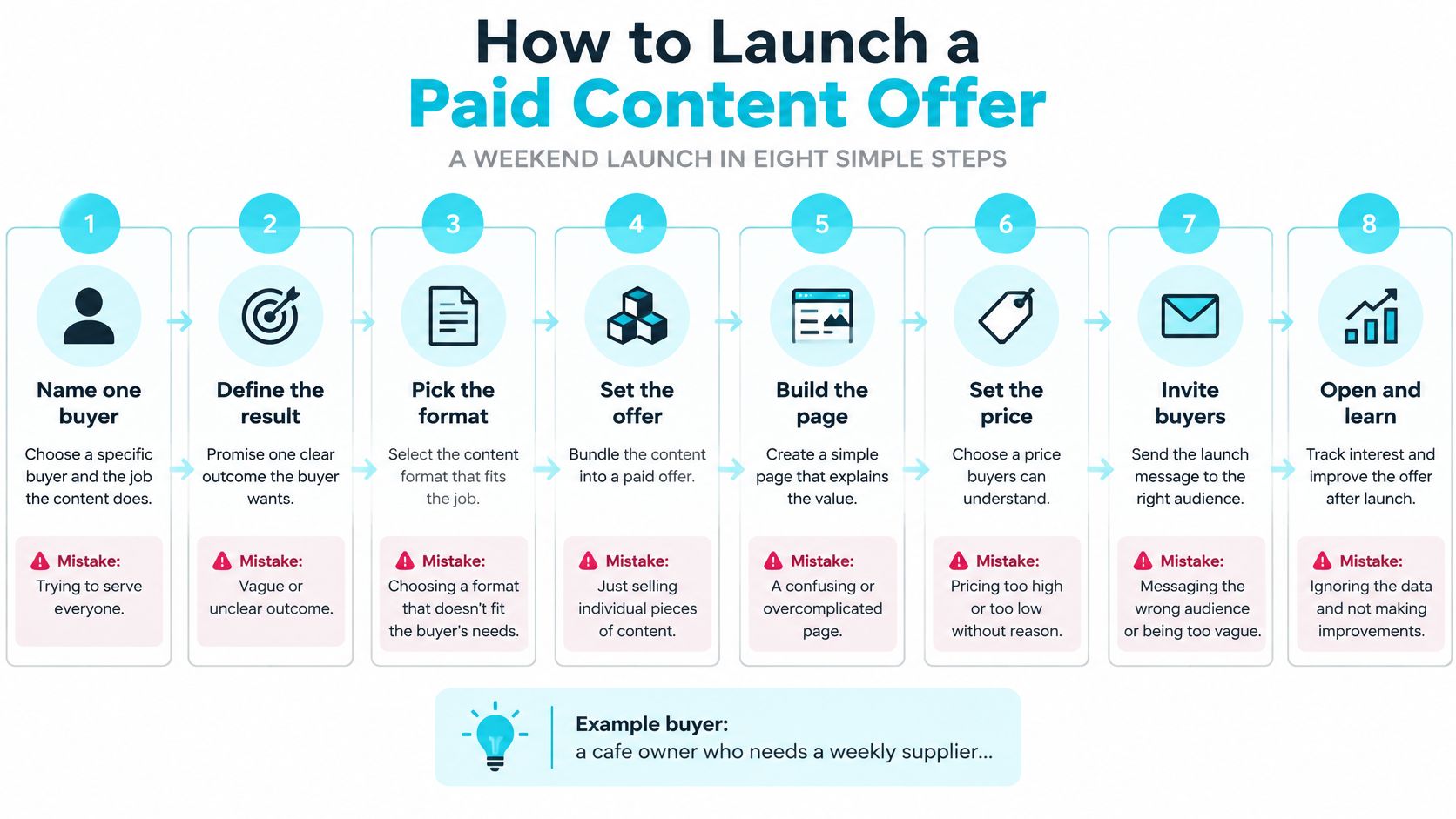
Eight Steps in Order
Name one buyer and the job. Be specific enough to reject other readers. For example, the buyer is a cafe owner who needs a weekly supplier checklist. The mistake is writing for a general audience that likes business advice.
Use the single format already chosen. Write a one-sentence promise the receipt could repeat without embarrassing the publisher. The mistake is describing the contents instead of the result, such as "12 lessons and three PDFs" instead of "cut the weekly ordering check from an hour to fifteen minutes."
Publish a free sample that's useful. Use one full post, the first lesson, or a shortened version of the file. The mistake is a teaser that gives nothing away, which tells cautious readers only that the writer doesn't trust the material.
Create the paid item on the same site as the public posts. Use the price already set and keep the sales page close to the free sample. The mistake is creating a second product for the same offer, which later produces duplicate access records and confused receipts.
Connect a payment account the publisher controls. Accept the cards and wallets those buyers already use, and name the accepted methods near the buy button. The mistake is hiding the payment method until checkout, where a surprise requirement causes abandonment.
Set the paid boundary. Logged-out visitors should see a useful teaser and a join button. The full piece should appear only after payment. The mistake is leaving paid text in the page source, where it can be read without buying. Server-side gating matters here: a premium block should be checked against the reader's login before it's rendered.
Put access in the receipt immediately. The buyer should receive a login or download link the same day, without waiting for a person to notice the order. The mistake is sending access later by hand. Manual delivery breaks at weekends, during illness, and exactly when a launch mention brings several buyers at once.
Announce it once to the current list and once on the homepage. Send readers to the free sample and the paid page, not to a long explanation of why the offer exists. The mistake is announcing repeatedly before delivery has been tested, which multiplies support requests instead of sales.
When the List Is Still Small
If the current list is under about 200 people, start with one paywalled post or a $9 file. A membership needs readers who already open the mail and expect the next edition. A one-time purchase asks less trust and gives the publisher a cleaner signal: either the promise is worth paying for, or it isn't.
Before announcing: The publisher should be able to buy the offer, receive access, log out, and confirm the paid material disappears.
Don't add a community, bonus call, or second tier to make a weak offer feel larger. Those additions create recurring obligations before there's recurring revenue. Finish the delivery checks first, then announce the offer.
How Buyers Receive Paid Content
Delivery should match the format already sold. It shouldn't require repricing the offer or moving the buyer to another product after checkout.
The diagram below shows the simple path from free preview to paid access.
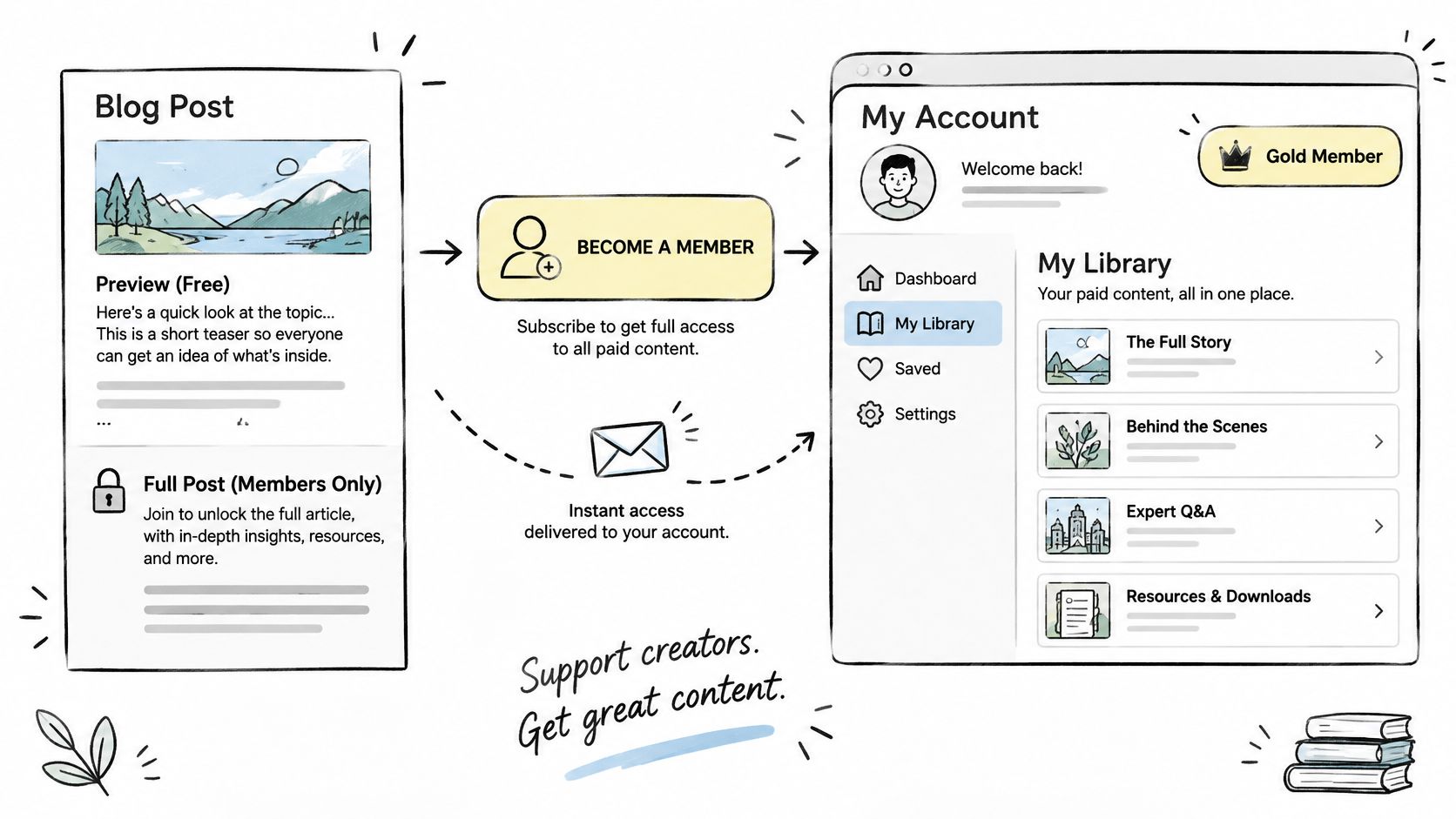
A membership needs an account, tier, and logged-in library. A paywalled post needs a public teaser with the full text reserved for a paid login. A newsletter needs a tier or tag so free readers receive the open edition and paid readers receive the rest. A digital file needs the download in the receipt and again inside the buyer's account, whether it's a PDF, audio lesson, or video.
How Each Paid Format Is Delivered and the Usual Fix
Format | Buyer receives | Setup step | Common failure |
|---|---|---|---|
Membership | Logged-in library at the purchased tier | Place the buyer on the correct tier at checkout | Paid reader sees only the teaser |
Paywalled post | Public teaser, full text after login | Write the teaser before the paid block | Full text visible while logged out |
Paid newsletter | Open edition for free readers, full edition for paid | Tag or tier at checkout | Free readers receive paid editions |
Digital file | Download in the receipt and in the account | Attach the file to the product | Missing download, file never attached |
Private PDF, audio, and video files need the same discipline as member posts. The file should sit behind the buyer's account, not behind an unprotected public link. Publishers who also circulate client documents can compare approaches to sharing proposals without losing control, but paid content still needs account-based access, not a link anyone can forward without a record.
Five Delivery Checks
Teaser first: Write it before adding the paid block, so the boundary is a publishing decision, not an accident.
Attach or gate: Attach the file to the product or mark the post members-only.
Tier or tag: Place the buyer on the correct tier or tag at checkout, with no manual step.
Receipt link: Send the login or download link in the receipt the same day.
Test purchase: Buy it personally, then confirm a logged-out visitor can't read the paid block.
Failures usually point to one missed setting. A missing download means the file was never attached to the product. A paid reader who sees only the teaser is probably on the wrong tier. A double charge usually means two products were created for one offer. A receipt with no access link means the confirmation template was left on its default.
Keep the first offer digital. Physical goods need shipping zones before checkout, and that extra setup stalls a content launch. Delivery is ready when the publisher can open the paid piece from the receipt in a private browser window, then log out and see only the teaser.
Email Sequences That Create Buyers
A one-off launch blast asks people to buy at the exact moment the publisher happens to send. A short automated sequence does a better job because it responds to what each reader did.
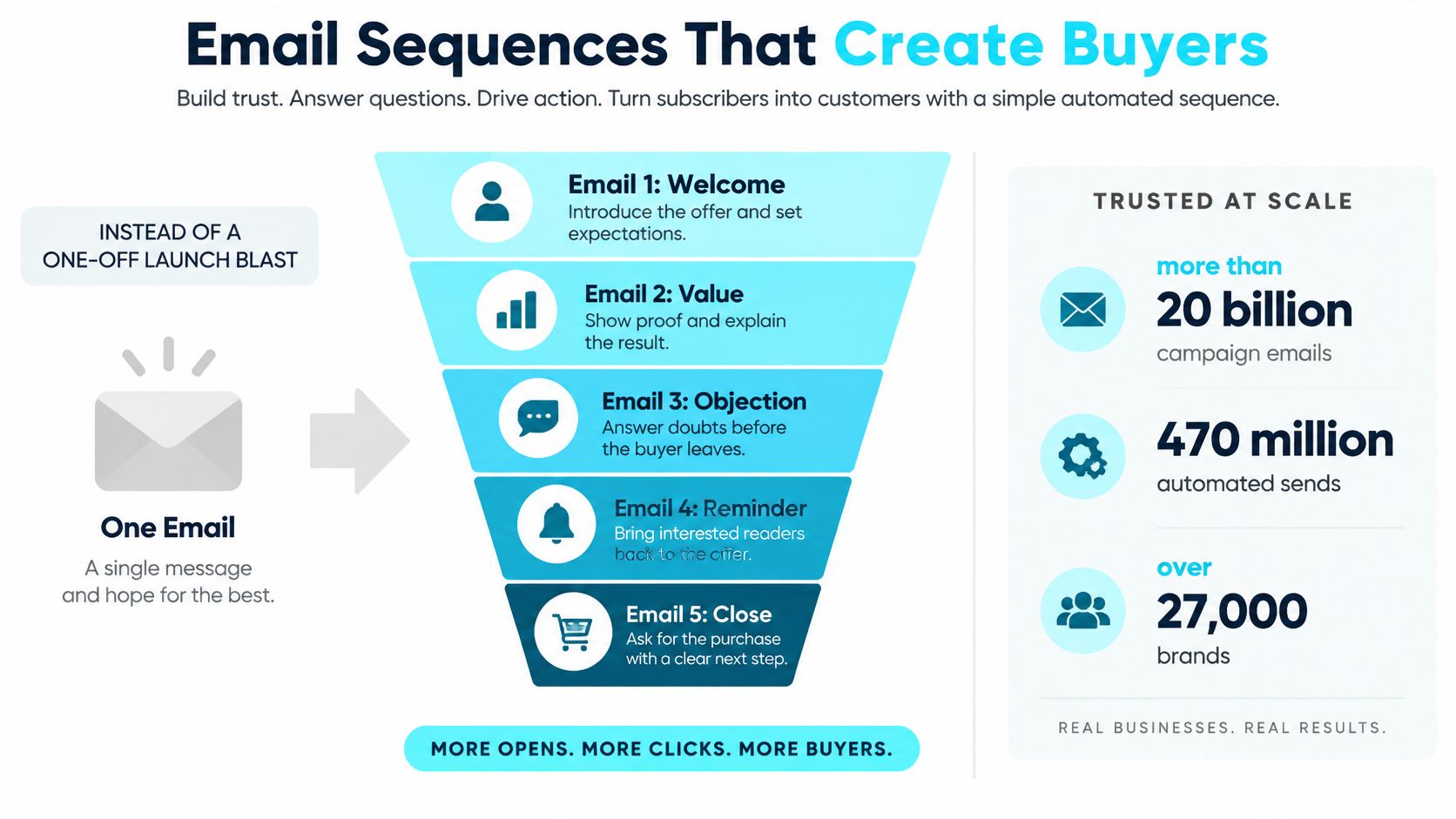
The contrast is substantial. Omnisend's 2025 benchmark, summarised in the Hello Retail ecommerce email statistics roundup, covered more than 20 billion campaign emails and 470 million automated sends from over 27,000 brands and found automated messages converted at 1.49%, compared with 0.08% for one-off campaigns, approximately 19 times higher. Readers should check how that benchmark defines conversion, because it measures automated sends across many brands rather than their own list. Even with that limit, the operating lesson is sound: relevance comes from timing and behavior, not from sending the same promotion to everyone.
The funnel below shows a shorter five-email version of the same idea.
Six Messages to Draft
Free sample and consent: Offer one useful sample or short guide and record permission clearly. Don't add people from a comment form or an old contact list.
Topic tag: Tag the reader by the topic chosen at signup. That tag decides which examples and offers arrive later.
Same-day welcome: Send one useful piece and set expectations for the publishing schedule. Don't lead with a discount before the reader has seen the work.
Teaching notes: Send two or three messages based on what the reader clicked, downloaded, or read. Each note should solve a small part of the larger problem and link back to relevant free material.
Offer note: Name the tier, the exact price, and what changes after joining. A reader shouldn't need to open checkout to learn whether the membership is monthly or annual.
Checkout reminder: Send it only to readers who started checkout and stopped. Keep it short and link back to the original checkout. Don't send a fake deadline to people who never showed buying intent.
Measure Purchases, Not Applause
Track opt-in rate, welcome click-through rate, sales-page conversion, checkout completion, refund rate, and revenue per recipient. Open rate shouldn't run the business. Privacy changes and inconsistent tracking make it a weak proxy for sales, while completed purchases and refunds show whether the sequence is commercially useful.
The small-list math keeps expectations honest. Borrowing that ecommerce benchmark only as a rough guide, if 100 people a month join the free list and 1.49% buy a $10 membership, the automation produces about one or two new members a month before any broadcast or referral. That's slow. It's still more dependable than a single promotional send to people who never asked for an offer, and it keeps working for every new signup when the publisher isn't running a launch.
A useful test: If a welcome email can't help a reader who never buys, it isn't finished yet.
Draft all six messages this week. Connect each one to a trigger, such as a guide download, premium article read, topic click, or abandoned checkout. Review revenue per recipient after enough readers have passed through the full sequence, not after the first day.
Own the Audience You Sell To
Reach isn't the same as an audience a publisher can contact next month. That distinction decides whether a content business survives a suspended account, a fee change, or a platform shutdown.
A 2025 Creator Spotlight survey of 427 creators found that creators who own their audience were 2.7 times more likely to earn at least $31,000 than creators building entirely on rented platforms. The result is self-reported survey data, so it's a warning rather than a promise or a global estimate. It still challenges the habit of treating follower counts as customer relationships.
Renting distribution means relying on a social feed or a host that won't provide the list. Owning the relationship means the publisher can export emails and posts, set prices, see failed payments, and keep billing readers if one social account is suspended. Native full data export is preferable to limited export, because a list without the posts and media still leaves rebuilding work behind.
Six-Point Ownership Check
Subscriber export: Download email addresses and membership status without asking support.
Post export: Retrieve posts, media, and attachments in a portable format such as Markdown and JSON.
Price control: Set membership and product prices without a marketplace discount overriding them.
Failed-payment record: See which renewals failed and contact those readers before access ends.
Written stack cost: Count the CMS, email delivery, payment, analytics, SEO, and migration tools together.
Outside backup: Keep a second copy of the list and archive outside the host, updated on a schedule.
Practical guidance on owning an audience instead of renting it is most useful before a migration or account problem forces the issue. Exports should be tested while everything's working. A downloadable file that omits paid status or post attachments isn't a real exit plan.
Buyer trust belongs in this check too. Paid readers reasonably ask what a person wrote and what a tool changed. State on the sales page when a piece used AI for editing or translation, keep human review on anything behind the paywall, and don't present model output as original reporting. That one short disclosure protects renewal decisions better than silence.
A lower platform fee isn't cheaper if the publisher still pays for a separate site, email tool, and membership plugin and can't take the list when leaving. Exportability is part of the price. Count it alongside card processing before choosing where readers will buy.
Pick One Offer and Start This Week
Which offer can you publish this week, price after fees, and deliver without losing control of the customer list? Start with one format and one clear promise. A platform's headline fee is only part of the cost: count payment processing and the other tools needed to run the offer.
For a small paid publication, a percentage-based platform fee can cost less at low revenue than a flat subscription, while a flat fee can leave more as sales grow. Compare the full stack and choose based on what remains after fees, not on which content format is popular.
If you already pay for a site, newsletter, and membership tool, VeloCMS Pro costs a flat $9 per month and includes the blog, newsletter, AI editor, 41 themes, and BYOK commerce. It sells digital products, paywalled posts, and paid memberships through Stripe with a 0% platform fee. Stripe processing fees still apply, and you can export your posts, media, and subscriber list.
VeloCMS has no free plan, and every plan starts with a 14-day free trial. The platform charges a 0% fee on Stripe sales, with only Stripe processing fees applying. Compare options on the side-by-side comparison page.
Keep the launch small: write one promise sentence, prepare a free sample, and make a test purchase. Then set up the paid post or membership through Stripe and check the buyer experience before announcing the offer. You can visit VeloCMS to start its 14-day trial.