Ghost vs WordPress · Oct 23, 2026
Ghost vs WordPress in 2026: An Honest Comparison
A publisher has a draft ready, a newsletter to send, and another plugin update waiting. Ghost is usually the better fit when publishing and paid readership are the business; WordPress is usually the better fit when the site needs broader business functionality. Neither wins universally. The useful G

A publisher has a draft ready, a newsletter to send, and another plugin update waiting. Ghost is usually the better fit when publishing and paid readership are the business; WordPress is usually the better fit when the site needs broader business functionality. Neither wins universally. The useful Ghost vs WordPress comparison starts with what the operator can maintain, not which dashboard has the longer feature list.
Table of Contents
The Short Answer for Busy Publishers
WordPress offers flexibility. Ghost offers a more focused publishing workflow. That distinction matters more than a generic claim that either platform is easier, cheaper, or faster.
A small business may need articles alongside booking, product sales, or custom customer journeys. A newsletter publisher may need articles, subscriber accounts, and paid access to work together without assembling separate systems. Those are different operating requirements, even when both organizations describe their site as a blog.
Ghost's integrated publishing-and-membership model reduces the number of connections a publisher must coordinate. WordPress's extensibility gives an operator more freedom to choose components. The trade-off is responsibility: someone has to maintain the resulting setup.
The decision behind the feature list
A useful comparison separates three questions:
Functional fit: Does the platform support the business as it operates, rather than as its owner hopes to simplify it?
Operational fit: Can the team handle updates, troubleshooting, email configuration, and performance work?
Transition risk: Can the organization move its archive and audience without losing essential behavior?
A platform can win the first question and lose the others. A flexible system isn't economical if nobody can maintain it. An integrated system isn't simpler if the business must rebuild important workflows outside it.
Practical rule: Choose the system that makes the publication's essential work routine, not the system that makes every imaginable feature possible.
The recommendations differ accordingly. A straightforward, budget-conscious blog deserves a different answer from an established membership publication or a business site with custom functionality. For existing sites, the comparison must also account for what already works. Replacing a functioning system has a cost even when the replacement looks cleaner.
What Ghost and WordPress Are Built to Do
WordPress began as a blogging tool in 2003 and became a general-purpose content management system. W3Techs' WordPress usage survey currently reports WordPress on 39.6% of all websites and 58.3% of sites whose content management system it can identify, illustrating the depth of adoption behind today's migration decisions.
That history matters because many WordPress sites aren't just collections of articles. Their operators have accumulated design decisions, plugin-dependent functions, and business processes around the platform. Moving away means evaluating those dependencies, not merely finding another editor.
Ghost takes a narrower approach. Its publishing-and-membership architecture centers on content and the relationship between a publication and its readers. The detailed audience workflow matters later; the foundational distinction is a generalist toolkit versus a publishing system.
Ghost vs WordPress at a Glance
Criteria | Ghost | WordPress |
|---|---|---|
Primary fit | Publications and audience-supported content | Blogs and broader business websites |
Extension approach | Publishing-focused core with integrations | Themes, plugins, and external services |
Newsletter workflow | Integrated with publishing | Usually assembled through additional tools |
Membership workflow | Native publishing membership model | Plugin or service selection required |
Hosting choices | Self-hosted Ghost or Ghost(Pro) | Self-hosted, managed hosting, or WordPress.com |
Performance responsibility | Validate theme and infrastructure | Validate hosting, theme, plugins, and caching |
Migration concern | Replacing unsupported source-site behavior | Rebuilding the destination's chosen stack |
The table is a starting point, not a purchasing specification. Hosting arrangements and selected services can change how much work remains with the operator.
Hosting changes the comparison
Self-hosting and managed hosting aren't interchangeable choices. Self-hosting leaves the operator responsible for infrastructure decisions. Managed services shift some responsibilities to a provider, but publishers still need to establish exactly which responsibilities the contract covers.
WordPress.com is a hosted service, while self-hosted WordPress and managed WordPress hosts represent other deployment choices. Ghost similarly offers self-hosting and Ghost(Pro). Comparing self-hosted WordPress with managed Ghost without acknowledging that difference confuses software architecture with purchased operations.
For a small business still defining its requirements, Read More Info's a blogging guide for small businesses provides a useful starting resource before platform selection.
The architectural choice should follow the site's job. A publisher shouldn't adopt a general-purpose system merely because expansion is theoretically possible. Equally, a business shouldn't remove essential functionality just to fit a narrower publishing platform.
Pricing and the Real Cost of Ownership
The hosting invoice is only the visible part of a publishing budget. A fair comparison includes the software bill, the work required to keep the site operating, and the consequences when something fails.
For Ghost(Pro), the purchasing exercise is to check the current tier against audience and staff requirements. For self-hosted Ghost, the exercise includes server infrastructure and bulk-email delivery. For WordPress, it includes the selected hosting arrangement and every additional service needed to reproduce the intended workflow.
The differences are easier to see when the costs are separated rather than compressed into a headline monthly price.
Build a risk-adjusted cost model
Risk-adjusted total cost means accounting for both routine ownership and plausible disruption. It doesn't require inventing a financial forecast. It requires recording costs that a subscription comparison leaves out.
Cost category | What the publisher should record |
|---|---|
Monthly platform cost | Hosting, subscriptions, themes, and paid extensions |
Email delivery | Delivery service, configuration, and audience-related charges |
Maintenance effort | Updates, monitoring, compatibility checks, and troubleshooting |
Recovery exposure | Incident response, restoration work, and interrupted sales |
Replacement work | Abandoned plugins, changed services, and integration rebuilding |
WordPress doesn't automatically require paid tools in every category. A basic publication may use a restrained configuration, while an established business may already have technical staff and service contracts. The relevant number is the cost of the actual proposed stack, not an expensive hypothetical collection of plugins.
Likewise, self-hosted Ghost shouldn't be treated as a managed service merely because its application is focused. Someone still needs to own the server, backups, updates, and recovery process.
Security belongs in the budget
WordPress security reporting summarized by CSW cited 11,334 new ecosystem vulnerabilities in 2025, with 91% attributed to plugins and 9% to themes. The same report notes that only six vulnerabilities that year were in WordPress core.
Those figures don't establish the breach probability of an individual WordPress site. Vulnerability counts aren't successful attacks. They do justify asking who handles patching and restoration before calling a configuration inexpensive.
The cheapest platform is the one whose maintenance the team can actually sustain.
Ghost isn't risk-free. WordPress isn't an irrational financial choice. A technically supported business can reasonably pay for flexibility, while a small editorial team may reasonably pay to reduce operational work.
The same budgeting exercise underlies this discussion of the real cost of running a WordPress blog. The useful output is a responsibility list beside the bill, with a named owner for every recurring task.
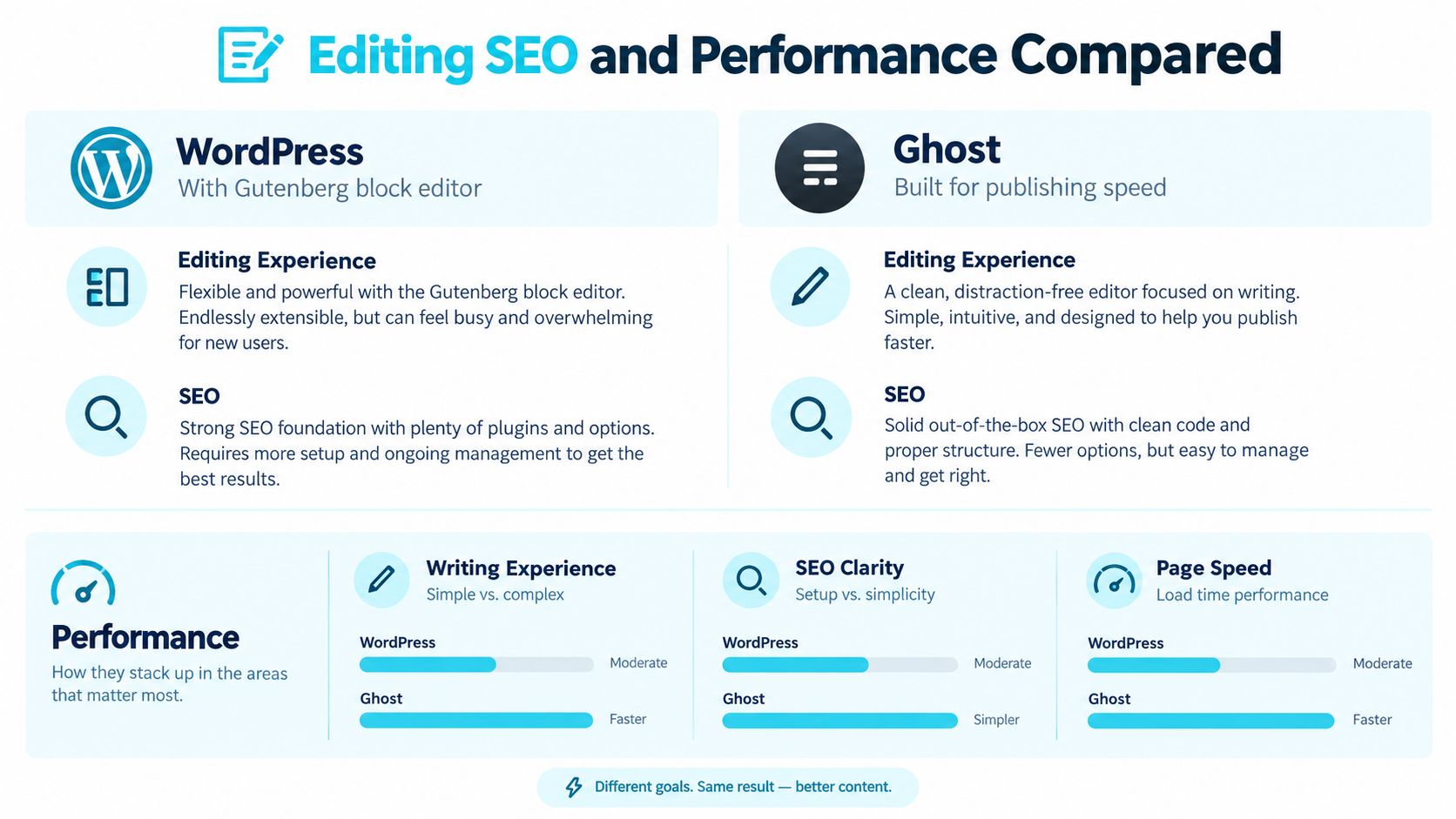
Editing SEO and Performance Compared
A useful editor test starts with an ordinary article, not a polished demonstration. The publisher should bring a draft containing headings, images, links, an embed, and a correction that needs to be made after publication.
WordPress's Gutenberg block editor suits work that combines writing with page composition. Ghost's more focused editor is a stronger candidate when the daily task is preparing and publishing articles. Neither experience should be judged solely from an empty document.
The practical question is whether the chosen interface reduces editorial work without restricting necessary layouts.
SEO control isn't an SEO result
Ghost's built-in approach to metadata, canonicals, and sitemaps contrasts with WordPress configurations that commonly add tools such as Yoast SEO or Rank Math for expanded controls. WordPress offers a broader route to specialized configuration, but the operator must decide which controls are necessary and maintain them coherently.
The comparison shouldn't imply that WordPress has no native SEO foundations or that installing an SEO plugin creates a complete strategy. Equally, having built-in controls doesn't prove that a Ghost installation outputs the correct information for a particular publication.
A sensible evaluation checks the rendered page:
Indexing intent: Important pages should have the intended canonical and indexing treatment.
Metadata: Titles and descriptions should reflect the article rather than a forgotten template.
Structured data: Output should represent the actual content and avoid contradictory additions.
Editorial execution: Headlines, headings, and internal links still require judgment.
For the editorial side, Month17's guide to keyword placement for SEO is a relevant companion to platform configuration. A CMS can expose controls; an editor still has to use them appropriately.
Performance favors a repeatable baseline
A Ghost and WordPress performance comparison from Refact cites a 2026 same-host, default-theme benchmark from The Stacc of approximately 50–200 ms TTFB, 0.8–1.5 s LCP, and 85–95 Lighthouse points for Ghost, against 200–800 ms TTFB, 1.5–3.0 s LCP, and 40–60 Lighthouse points for WordPress. Refact notes these were single benchmark tests.
These are deployment results, not platform limits. Optimized hosting, caching, lightweight themes, image optimization, and restrained plugin use can bring WordPress close to Ghost-level results. A heavy custom Ghost theme or poor infrastructure can remove its advantage.
The operational advantage is repeatability, not a guaranteed score. A leaner starting point can require less ongoing tuning, but the production site still needs measurement.
A fair test uses matching content, comparable templates, the same geographic test location, and the same cache conditions. The architectural trade-off also informs the discussion of WordPress's plugin model and its operational costs, rather than supporting a blanket argument against extensions.
Newsletters Memberships and Integrations
The sharpest difference appears when a publisher sells access to content and maintains an email relationship with readers. At that point, the CMS isn't just storing articles. It participates in the business's audience operations.
Ghost's Members documentation describes support for signup, paid subscriptions, authentication, and newsletters. Ghost's newsletter documentation names Mailgun as the only supported bulk-email provider for self-hosted Ghost, configured with Mailgun API keys, while Ghost(Pro) includes email delivery.
That distinction matters. Native newsletter functionality doesn't mean every deployment includes the same delivery arrangement, or that every email responsibility disappears.
Compare the complete reader journey
Ghost's newsletter documentation describes delivery to free members, paid members, or selected segments, with multiple newsletters allowing readers to choose different content categories. Separate subscription settings and templates make the audience model more specific than a single mailing list attached to a blog.
For evaluation purposes, the publisher should follow a reader through the entire journey:
Signup: Confirm how a reader joins and which permissions are recorded.
Subscription: Check what happens when payment status changes.
Access: Verify that authentication leads to the correct content.
Delivery: Establish who investigates missing email and configuration problems.
Departure: Test unsubscribing, cancellation, and data export separately.
WordPress core doesn't supply an equivalent end-to-end paid-membership and segmented-newsletter workflow. A comparable deployment typically combines plugins or external services. That can work well, especially when a business needs functions beyond publishing, but the operator must own billing synchronization, audience data consistency, and compatibility.
The important distinction isn't whether integration is possible. It's whether the organization has someone responsible when two connected systems disagree.
Consider consolidation without skipping due diligence
A consolidated publishing alternative can also enter the shortlist when blogging, newsletters, and memberships account for most requirements. The publisher's platform combines those functions in one subscription, includes native email delivery, and advertises 0% platform commission; its pricing information states that every plan starts with a 14-day free trial and that there is no free plan.
That arrangement deserves the same scrutiny as Ghost or WordPress. An integrated invoice doesn't settle provider limits, delivery ownership, payment-processing charges, API behavior, or export requirements. Each needs confirmation against the publication's intended operation.
For businesses comparing audience platforms more broadly, the discussion of Substack, Ghost, and beehiiv revenue models provides another evaluation route. The decision should follow how subscriptions operate, not merely whether a pricing page includes the word newsletter.
Migrating Between Ghost and WordPress
A successful import doesn't prove a successful migration. It proves that a tool accepted some data.
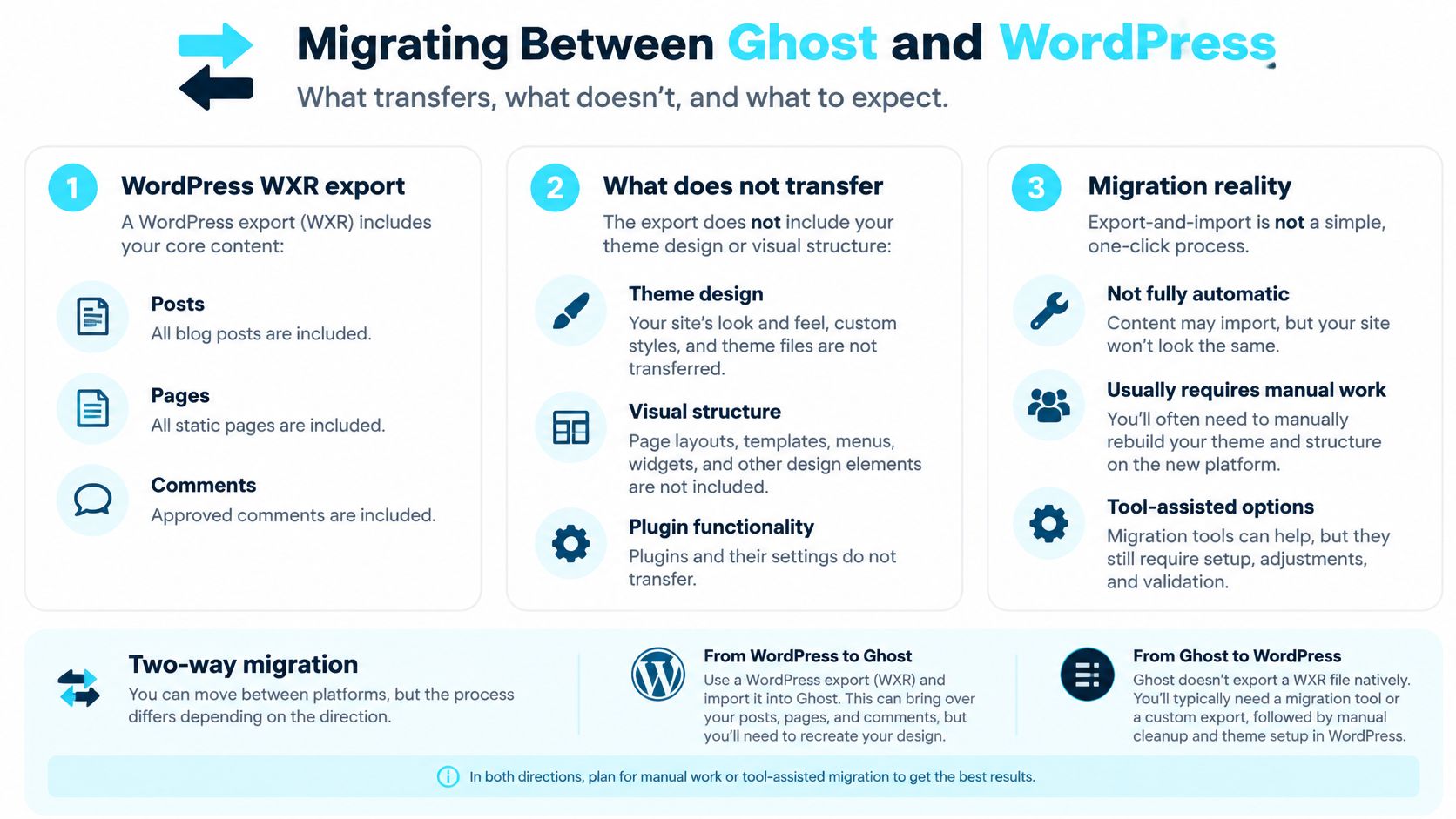
WordPress's export documentation explains that standard exports can contain posts, pages, and comments, but not theme design, customizations, or plugins. Its migration guidance also distinguishes WXR content from widget configuration and plugin settings, with media and attachments requiring separate import attention.
The destination therefore needs more than content. It needs a verified replacement for the source site's important behavior.
Preflight inventory before any transfer
The publisher should record the source site while it still works. An archive of titles isn't enough.
URLs and search assets: Save indexable addresses, metadata, canonicals, sitemap entries, structured data, and image alt text.
Functional dependencies: Record shortcodes, custom pages, forms, downloads, and plugin-generated output.
Audience records: Document memberships, access rules, email permissions, subscription states, and suppression requirements.
Measurement: Preserve analytics configuration and define how post-launch behavior will be compared.
Recovery: Keep a restorable source environment and establish who can authorize rollback.
A WordPress-to-Ghost migration guide from Superblog notes that uncommon shortcodes, custom post types, custom fields, and plugin-generated content aren't carried over by the importer and need manual cleanup or rebuilding. URL preservation, metadata, canonicals, alt text, and redirect testing also sit outside a basic importer's job.
Moving in the opposite direction doesn't remove the need for that inventory. A Ghost-to-WordPress project must establish how the chosen destination tools will represent audience access and newsletter operations. File conversion alone can't demonstrate equivalent behavior.
Acceptance testing after the move
The test plan should compare the source inventory with the live destination, not just inspect whether the homepage looks right. Blu Dragonfly LLC's website migration guidance for small businesses is a relevant planning resource alongside the platform-specific work.
Search acceptance means crawling both sites, comparing indexable URLs, checking redirects and redirect chains, validating canonical tags, and checking sitemap coverage. Content acceptance means opening images and downloads, inspecting representative archives, and checking previously dynamic content for raw shortcodes or missing components.
Audience testing needs its own pass. Free and paid accounts should receive the intended access, signup permissions should remain correct, and unsubscribe handling should work independently of account authentication.
A faster importer isn't automatically a lower-risk migration. The safer project makes missing behavior visible and keeps a workable route back.
Rollback also needs a data rule. If new subscribers or payments arrive after launch, restoring an old snapshot without reconciling those changes can create another problem. The cutover plan should define how new activity is preserved before anyone changes the production system.
Which Platform Fits Your Situation
The strongest recommendation depends on the publication's limiting resource. For one operator, that's cash. For another, it's technical time or the ability to preserve an established business workflow.
Choose around the real constraint
A solo blogger on a tight budget should shortlist a restrained WordPress setup. That recommendation fits a site whose main requirement is publishing articles without an elaborate audience stack. It becomes less persuasive if the owner immediately adds several services and has nobody available to maintain them.
A newsletter creator selling paid subscriptions should shortlist Ghost. Its focused audience workflow is the relevant advantage, rather than an abstract claim that it is better for every writer. It is a weaker fit when the publication also needs substantial unrelated business functionality.
A business requiring ecommerce, booking, or custom processes should investigate WordPress first. Its broader extensibility is the reason to accept additional configuration work. The operator should avoid assuming every desired extension will work together without testing.
Situation | Strong candidate | Reason to reconsider |
|---|---|---|
Developer-led publication | Self-hosted Ghost | Infrastructure work isn't actually wanted |
Small editorial team | Managed or integrated publishing service | Essential requirements fall outside the service |
Established customized site | Existing platform or carefully scoped replacement | Migration removes important business behavior |
A developer may prefer self-hosted Ghost because a focused application suits the intended publication. That is an ownership choice, not a route to avoiding operations. The developer should be willing to maintain what remains outside the application itself.
An existing site deserves a higher switching threshold
A small team with limited maintenance capacity may rationally choose a higher subscription bill in exchange for fewer responsibilities. The decision should still account for its actual workflow, not the appeal of consolidation alone.
Similarly, a stable WordPress site doesn't need replacing merely because another platform has a cleaner editor. If the existing configuration meets business needs and has dependable ownership, migration may introduce more work than it removes.
The right choice minimizes unnecessary responsibility while preserving necessary capability. That can point to Ghost, WordPress, or a consolidated alternative without requiring any of them to win every category.
How to Decide and What to Do Next
Choose based on what the organization is willing to maintain. A feature that nobody can configure, test, or repair isn't a meaningful advantage.
The decision should survive a short written review, not just a product demonstration.
Answer the ownership questions
Does the site need functionality beyond publishing? List the actual requirements, including existing functions that might otherwise be forgotten.
Who will handle updates and security? Name a person or contracted provider, and specify what that responsibility includes.
What does audience revenue depend on? Identify whether the critical path is search traffic, email delivery, paid access, product sales, or some combination.
These answers should determine the shortlist. They should also reveal which vendor questions remain unanswered before purchase.
Run a representative test
A useful trial uses real material: an older article, an image-heavy post, a download, a custom page, and any access-restricted content the business relies on. The candidate system should be evaluated through publication, reader access, maintenance, and export, rather than through editing alone.
The test should end with a written decision. Any missing behavior needs an owner, an acceptable workaround, or a reason to reject the candidate. Unresolved assumptions shouldn't become launch-day tasks.
This week's practical next step is to select a candidate and run a small migration into a non-production environment. Compare the result against the source inventory, record the unresolved issues, and commit only when the publication can demonstrate that its essential work still functions.
VeloCMS offers blogging, newsletters, memberships, and site theming in a subscription-based platform for creators and small teams. Publishers weighing Ghost against WordPress can visit VeloCMS to compare its consolidated workflow with their current stack and test representative content before committing.