email signup list · Nov 17, 2026
How to Build an Email Signup List That Grows
An email signup list grows when a form appears where readers already want something, makes a specific offer, and asks for one field. That matters because the UK Data & Marketing Association's 2019 Marketer Email Tracker reported just over £42 for every £1 spent, with about two thirds of the marketer
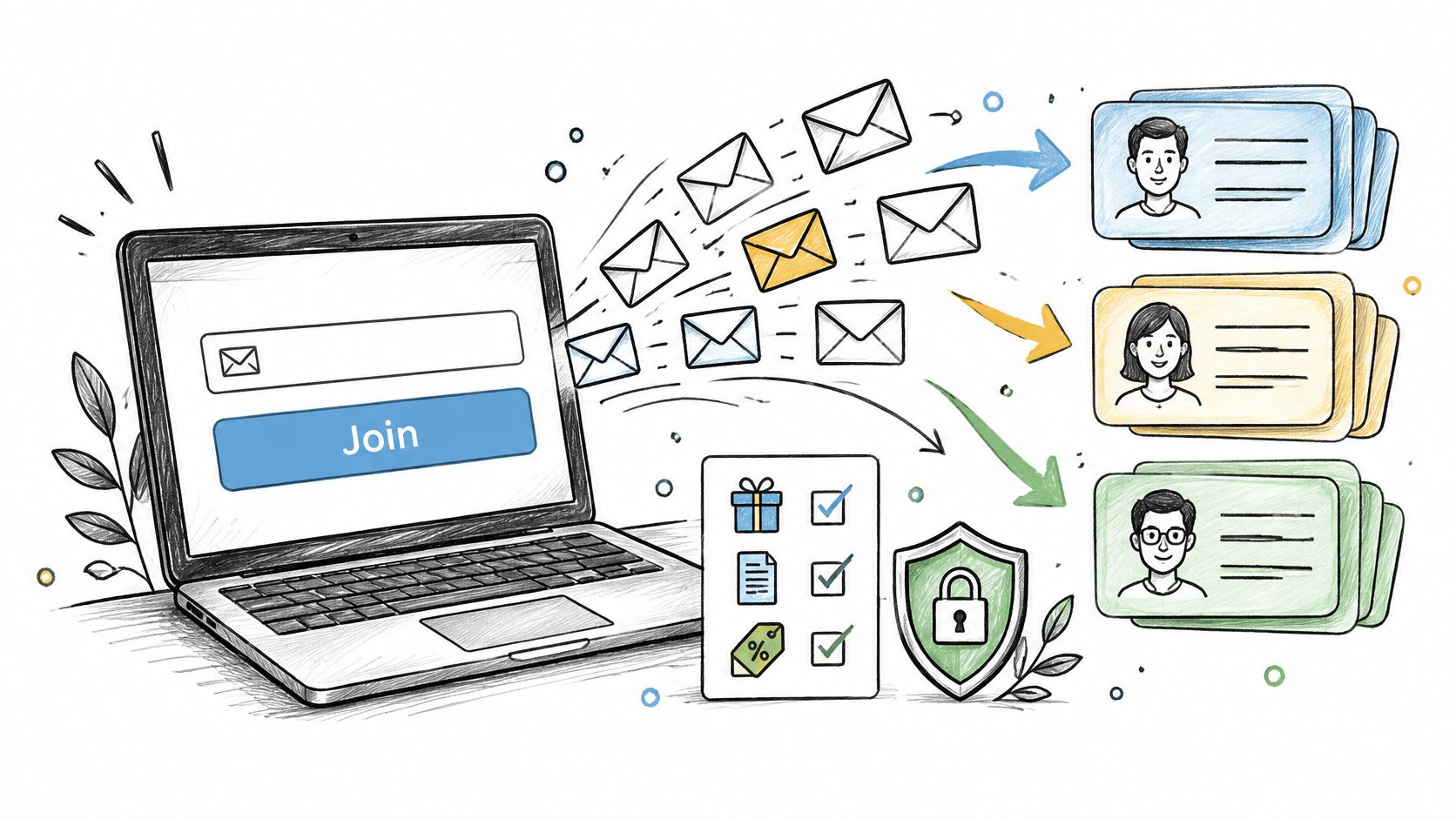
An email signup list grows when a form appears where readers already want something, makes a specific offer, and asks for one field. That matters because the UK Data & Marketing Association's 2019 Marketer Email Tracker reported just over £42 for every £1 spent, with about two thirds of the marketers surveyed measuring ROI, a figure best read as a benchmark, not a guarantee. A reachable, consented list is what makes that kind of return possible.
Table of Contents
Realistic Opt-In Rates for Each Signup Format
Start with modest expectations. A newsletter form benchmark covered by Claspo's newsletter signup examples reported 3.67% for standard email-capture popups. That figure, not a generic industry average, is the honest anchor for a first planning estimate.
Form mechanics shift the result. Multi-step, choice, teaser, and gamified formats ask for a small action before the email field, and that early yes appears to carry more people through the full ask. The trade-off is real. Gamified forms can attract prize seekers who never open issue two, while a plain embedded form at the end of a strong post may convert fewer visitors and keep far more of them. Judge the format by confirmed subscribers who remain reachable, not by the first spike in submissions.
Reported Opt-In Rates by Signup Form Format
Form format | Reported opt-in rate | Source |
|---|---|---|
Standard email-capture popup | 3.67% | Claspo newsletter form benchmark |
Multi-step popup | 4.94% | Claspo newsletter form benchmark |
Choice-button form | 5.00% | Claspo newsletter form benchmark |
Teaser-based popup | 6.89% | Claspo newsletter form benchmark |
Gamified popup | 8.08% | Claspo newsletter form benchmark |
Treat every row as a hypothesis, not a promise. Samples skew toward particular industries, traffic types, and popup implementations, so a retail discount popup tells a niche newsletter publisher very little. Search traffic, loyal direct readers, and paid clicks also behave differently, and repeated impressions can inflate the denominator if unique visitors aren't counted separately. The rate that matters is confirmed subscribers divided by unique visitors who saw the form, split by traffic source.
Email still earns the effort. DataReportal's 2025 global research found that 75% of online adults use email at least once per month, so an owned list reaches readers without depending on a social feed or a paid auction.
Practical rule: judge a format by confirmed subscribers, engagement, unsubscribe rate, and complaint rate, not raw submissions.
A format that doubles submissions while doubling complaints is borrowing against sender reputation. Measure lift against consented, reachable subscribers, because a larger list with dead addresses and complaint spikes costs more than it returns.
Consent and Privacy Rules to Meet First
Every signup needs affirmative consent, and the form must be able to prove it. According to the ICO direct marketing guidance, consent must match the particular type of marketing promised and pre-ticked opt-in boxes do not qualify as active consent. The sender must also identify who is contacting the recipient and explain how to opt out.
The UK soft opt-in exception is narrower than many site owners assume. The ICO guide to PECR electronic mail marketing limits it to people who bought or negotiated to buy, for similar products or services, with an opt-out offered at collection and in every message, and it does not cover prospective contacts or purchased email lists.
US rules focus on the exit. The FTC CAN-SPAM compliance guide requires a clear way to stop future marketing, including a stop-all option, with the opt-out working for at least 30 days and requests honoured within 10 business days.
Mailbox providers add their own gate. Gmail's sender guidance applies bulk requirements to senders delivering 5,000 or more messages per day to Gmail accounts, including authentication, no unsolicited mail, and easy unsubscribing. This article is general information, not legal advice.
Consent and Sending Rules That Apply to Signup Lists
Rule | Applies to | What your form and emails must do |
|---|---|---|
Affirmative consent under PECR | UK marketing email | Leave the consent box empty until the reader ticks it; the soft opt-in covers existing customers only |
CAN-SPAM opt-out | Commercial email sent to US recipients | Offer a stop-all option, keep opt-outs working at least 30 days after the send, honour requests within 10 business days |
Bulk sender authentication | Senders reaching 5,000 or more messages a day to Gmail | Authenticate with SPF, DKIM and DMARC, avoid unsolicited mail, make unsubscribing easy |
Spam complaint ceiling | Gmail and Yahoo bulk senders | Keep spam complaints below 0.3% |
One-click unsubscribe | Gmail and Yahoo bulk senders | Support one-click unsubscribe in bulk mail |
The Double Opt-In Decision
Double opt-in reduces fake and accidental signups because the subscriber must click a confirmation link. Single opt-in removes that friction, which suits low-risk forms on owned pages, but it leaves weaker evidence if permission is ever questioned.
Choose by jurisdiction, acquisition source, and how well consent can be proved. Paid traffic, partner placements, and imported contacts argue for confirmation. A personal blog with a simple embedded form has a different risk profile.
For every subscriber, keep the form version, timestamp, source page, consent wording, and confirmation status. An export can preserve addresses while losing that evidence, which is why migrated lists need checking before the first send.
How to Build the Signup Form Step by Step
A working form can be built in an afternoon. The build order below puts placement and wording first, because those do more work than colours or borders.
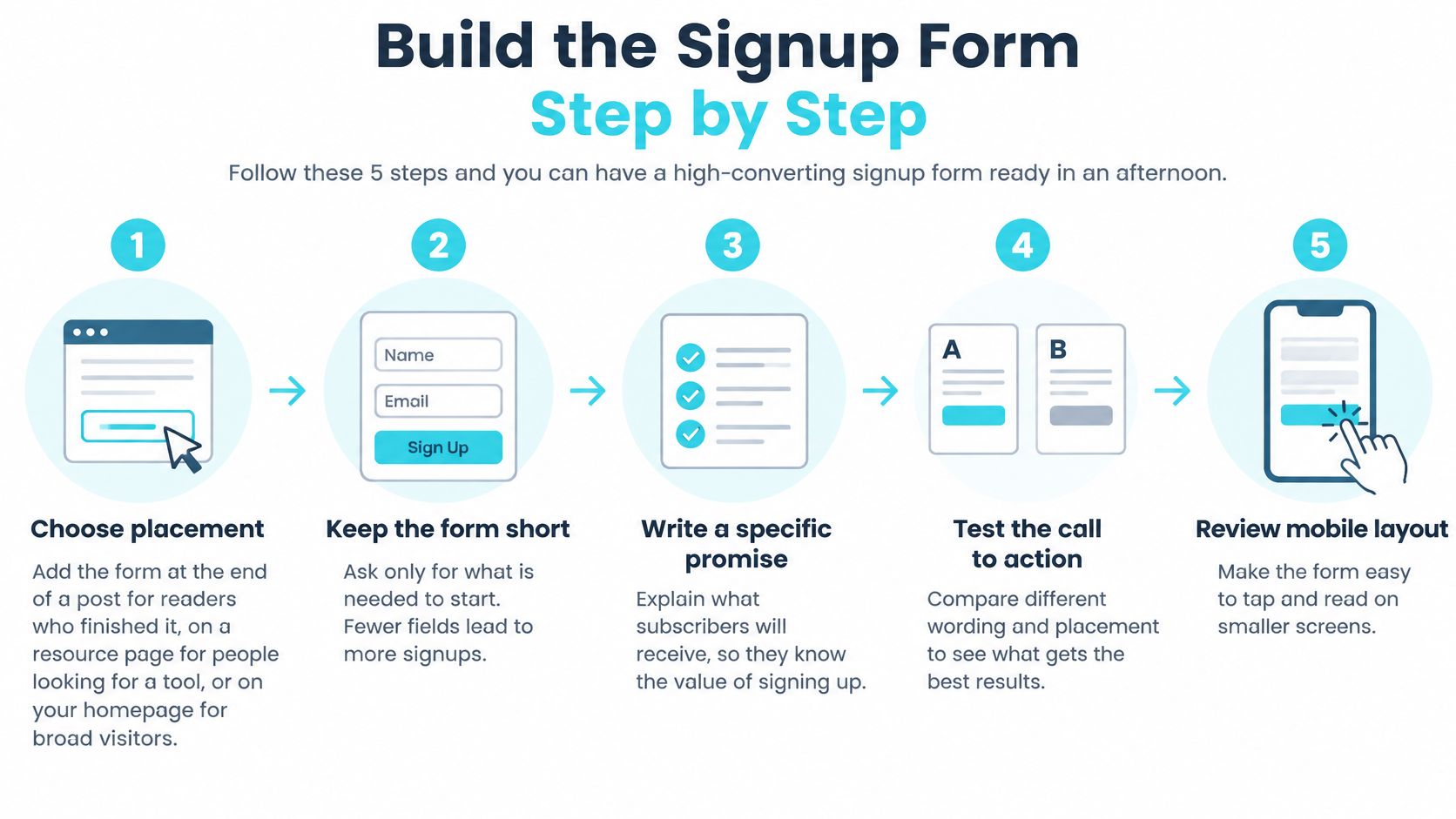
Choose placement by page type. Put an embedded form at the end of posts for readers who finished, a fuller form on a resource page for people hunting for a tool, and an exit-intent popup for visitors who are leaving anyway. One form per page type beats the same box everywhere.
Ask for email only. Add a first-name field only if greetings will use it. Every extra field gives a reader one more reason to stop, and names can be collected later through a preference page.
Name the outcome on the button. "Send me the checklist" tells the reader what happens next. "Submit" and "Sign up" say nothing, and vague buttons underperform clear ones on otherwise identical forms.
Put the promise and frequency on one line. A headline naming the asset, followed by a line such as one email every Tuesday, removes the two questions readers ask before subscribing. Saying how often mail arrives costs nothing and filters out people who would unsubscribe later anyway.
Show it once, then stop. Display a popup once per visitor and suppress it for existing subscribers. Repeated popups train regular readers to close boxes on sight, which hurts every future offer.
Make the confirmation page repeat the promise. State what is coming, which sender name and address it will come from, and where to look if it lands in a promotions tab. Readers who can't find the first email rarely go looking twice. Publishers comparing popup tools can review the newsletter popup listing alongside their current setup.
Test with a real address on two devices. Submit from a phone and a laptop, confirm the welcome email arrives, and check that the source field saved correctly. Local service firms that would rather hand this flow to an agency can look at offers such as email marketing for Omaha businesses.
Slips That Quietly Kill Signups
Hidden on mobile: the form renders on desktop but sits below a sticky banner or off-screen on a phone, where most casual reading happens.
Silent button: generic wording gives the reader no reason to finish.
Missing source tag: submissions arrive, but nobody can tell which page or offer produced them, so later segmentation has nothing to work with.
A working setup is easy to recognise. Submissions are counted per source, confirmations roughly match submissions, and every new contact carries a tag naming the form that captured it.
Choosing an Offer and Testing What Lifts Signups
A specific offer beats a prettier form almost every time. "Subscribe for updates" asks for an address in exchange for nothing the reader can picture. A publishing checklist, a niche report, a template, or a member-only issue gives a concrete reason to act now rather than later, and later usually means never.
Match the offer to the page. A checklist belongs on a how-to post, a pricing guide on a comparison page, and a template on the tutorial that teaches the task. Show the form after a reader reaches the end of a post, after meaningful time on the page, or on exit intent. Hide it from people who already subscribed.
A Test Method Worth Copying
Define conversion first, for example as completed submissions divided by form views, and track form starts separately if your tool records them. iContact's signup form guidance suggests waiting for at least a few hundred form views per variant before drawing conclusions. Segment the baseline by device, traffic source, landing page, geography, and form type before changing anything.
Then change one variable at a time, in this order.
Promise or headline: the biggest lever, so it goes first.
Button wording: outcome language against the current label.
Field count: email only against email plus name.
Visual treatment: layout and colour last, because they rarely rescue a weak offer.
Sample size decides whether a result means anything. A two-day test with a thin sample is unreliable. A test that runs until each variant has enough form views to compare gives a defensible first read. Small sites need patience here, and calling a winner early is the most common testing error.
A Worked Example
Keep a control form with generic wording and run a checklist promise against it for two weeks. Give each variant an experiment ID and log impressions, starts, submissions, confirmation completions, and unsubscribe or complaint outcomes. If you also run referral offers, keep that traffic separate so incentivised signups don't distort the comparison; the mechanics of how referral rewards work are a useful reference for isolating that traffic.
A higher signup rate only counts if new subscribers confirm, open the welcome email, and stay.
An incentive that draws contacts who disengage immediately inflates the list and weakens the engagement signals mailbox providers watch. Raw conversion is the start of the judgement, not the end.
Onboarding and Segmenting Subscribers Who Stay Reachable
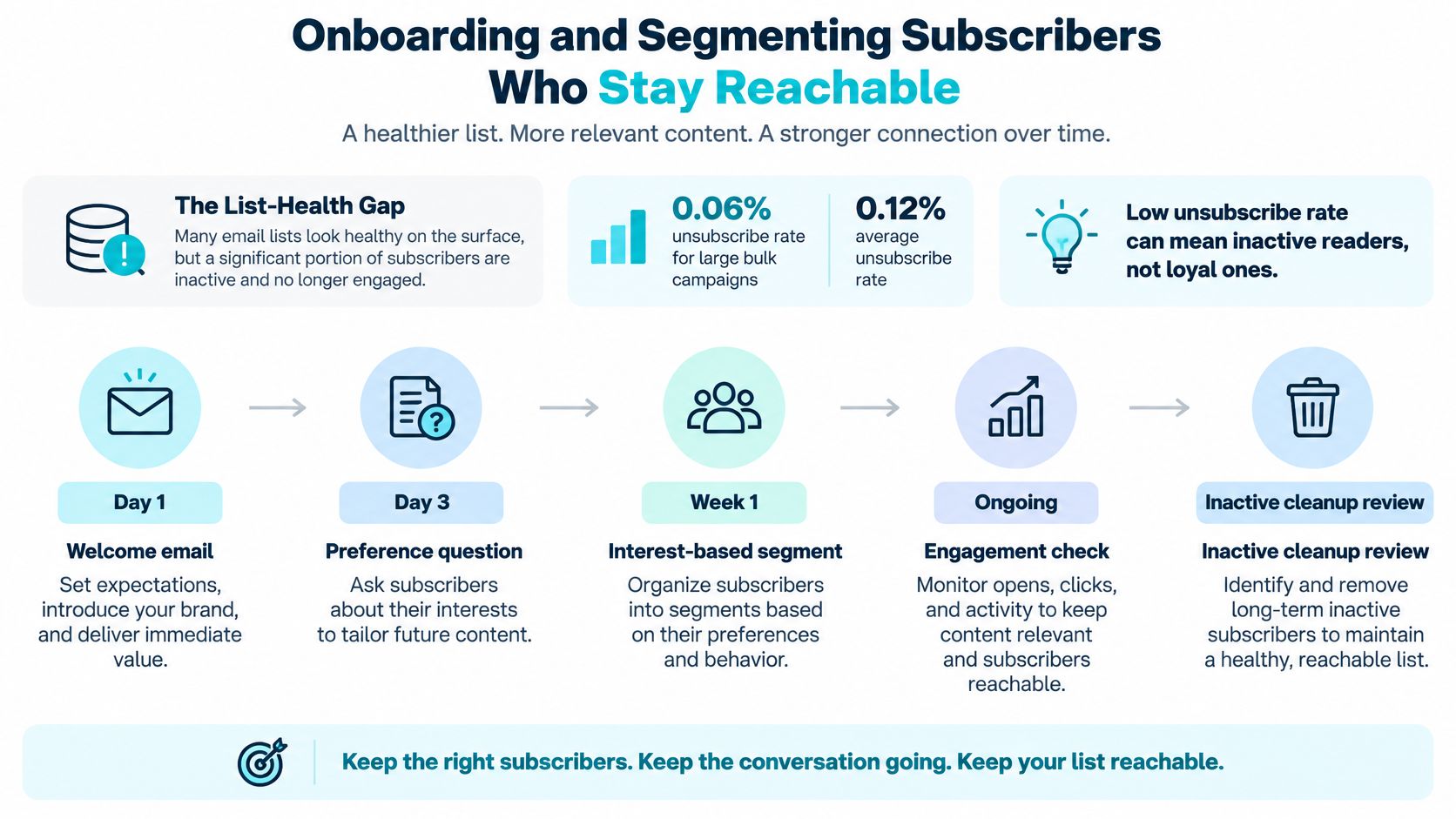
A low unsubscribe rate can mislead. Flexmail's international email benchmark reported a 0.06% unsubscribe rate for large bulk campaigns versus a 0.12% average, a pattern that may show lack of interest rather than loyalty. Readers who never open and never leave still drag on sender reputation.
That is why provenance matters as much as volume. Mailgun's deliverability findings note that Gmail and Yahoo require bulk senders to authenticate with SPF, DKIM, and DMARC, support one-click unsubscribe, and keep spam complaints below 0.3%, yet nearly 1 in 10 senders surveyed admitted purchasing lists or scraping contacts in the previous two years. Judge list health by acquisition source, confirmation status, recency, click activity, complaint rate, and inbox placement, not by total contacts.
First 30 Days After Signup
Send on | Message | Job |
|---|---|---|
Day 0 | Welcome email with the promised asset | Deliver what the form promised |
Day 2 | Most-read post or resource | Show the content people came for |
Day 5 | One preference question | Start building segments from declared choices |
Day 10 | Topic and frequency choice | Let readers set what they receive |
Day 30 | Re-engagement message | Confirm interest, or suppress addresses that never opened |
Day 0 sets the tone. Deliver the asset at the top, add one short line on what arrives next, and stop. A welcome email that leads with a sales pitch teaches new subscribers to ignore the sender, and that lesson sticks. Published posts can be sent to newsletter subscribers as campaigns from the same admin used to write the posts, which keeps the day 2 resource email a two-minute job.
Segments Built From Signup Data
Segments should come from the source tag and from declared choices and content clicks, not from extra personal data collected at the form. A checklist subscriber and a pricing-guide subscriber want different follow-ups, and the tag captured at signup is what makes that split possible. The reference on newsletter tag segmentation covers the tagging mechanics, and the small business newsletter tips from Boocoo offer a useful plain-language take on putting segments to work.
Every form must record a source tag, because segments are only as good as the tags captured at signup. Retrofitting tags months later means guessing, and guessed segments produce irrelevant mail.
Finish with suppression. After repeated ignored messages, stop sending automatically and say so plainly in the final email. Removing silent addresses feels like losing audience, but it protects delivery to the readers who want the next issue.
Audit Your Signup Form Before the Next Send
Run this checklist in order before the next campaign goes out. It takes under an hour and catches the failures that cause subscriber loss.
Test on a phone and a laptop. Confirm the form is visible, tappable, and readable on both.
Submit a test address. Check that the full welcome sequence arrives, in order, with working links.
Inspect the test subscriber record. The source tag and consent record must both be saved. A contact with an address and nothing else is a liability, not an asset.
Test unsubscribe and suppression. Click the link, then confirm the test address receives nothing further.
Read the numbers after the first campaign. Compare complaint and bounce results against the 0.3% spam complaint ceiling and investigate anything drifting toward it.
If numbers fall: check the source of the drop before changing the offer. A broken mobile form and a weak promise look identical in a top-line report.
One next step matters for anyone moving an existing list. Check that the export keeps consent evidence, not only addresses, because an address without its consent record can't prove permission. On VeloCMS, posts, media, and the subscriber list can be exported whenever wanted, so content and readers leave with the publisher. Confirm current plan details at the pricing page before switching. VeloCMS has no free plan, and every plan starts with a 14-day free trial.
Readers who want blogging, newsletters, and memberships in one plan, with native email delivery and tag-based segments for the list built here, can start a trial with VeloCMS. Bring an existing list or begin with a single email-only form, then use the audit above before the first send.