content management · Oct 15, 2026
Content Management for Creators and Small Teams in 2026
Most small teams do not have a content problem, they have a coordination problem. One person is writing posts in a doc, another is updating a landing page in a site builder, a newsletter lives somewhere else, and no one is fully sure which version is current or where the subscriber list sits. Conten

Most small teams do not have a content problem, they have a coordination problem. One person is writing posts in a doc, another is updating a landing page in a site builder, a newsletter lives somewhere else, and no one is fully sure which version is current or where the subscriber list sits. Content management has to fix that mess by giving the team one workable path from draft to publish to distribution, without forcing every update through a developer.
Table of Contents
What Small Teams Actually Need from Content Management in 2026
Three Content Management Approaches Available to Small Teams
What Small Teams Actually Need from Content Management in 2026
A small business owner, writer, or newsletter publisher usually needs something much simpler than an enterprise platform and much more disciplined than a folder full of disconnected tools. The setup has to let people draft quickly, review content without confusion, publish to the site without breaking the layout, and reuse the same material in email, membership areas, and landing pages.

That is why the question is not really “Which CMS has the most features?” It is “Which setup lets a small team keep shipping without glue work, duplicate entry, and version drift?” The answer depends on how the team publishes, who touches content, and how much time gets lost stitching tools together.
For creators and small teams, the right setup usually has to do five jobs well. It must support fast drafting, keep content organized, render pages cleanly, handle distribution, and make it possible to leave later without losing the work.
Practical rule: If a publishing stack needs a separate tool for every basic task, it's not simplifying operations. It's outsourcing the mess to integrations.
One useful example is the collaboration flow behind team publishing, which VeloCMS describes in its own help material on multi-author collaboration. The point isn't that every team needs the same features, it's that small teams need a system where the editorial workflow is visible and shared, not hidden across tabs.
How Content Management Works as a Workflow
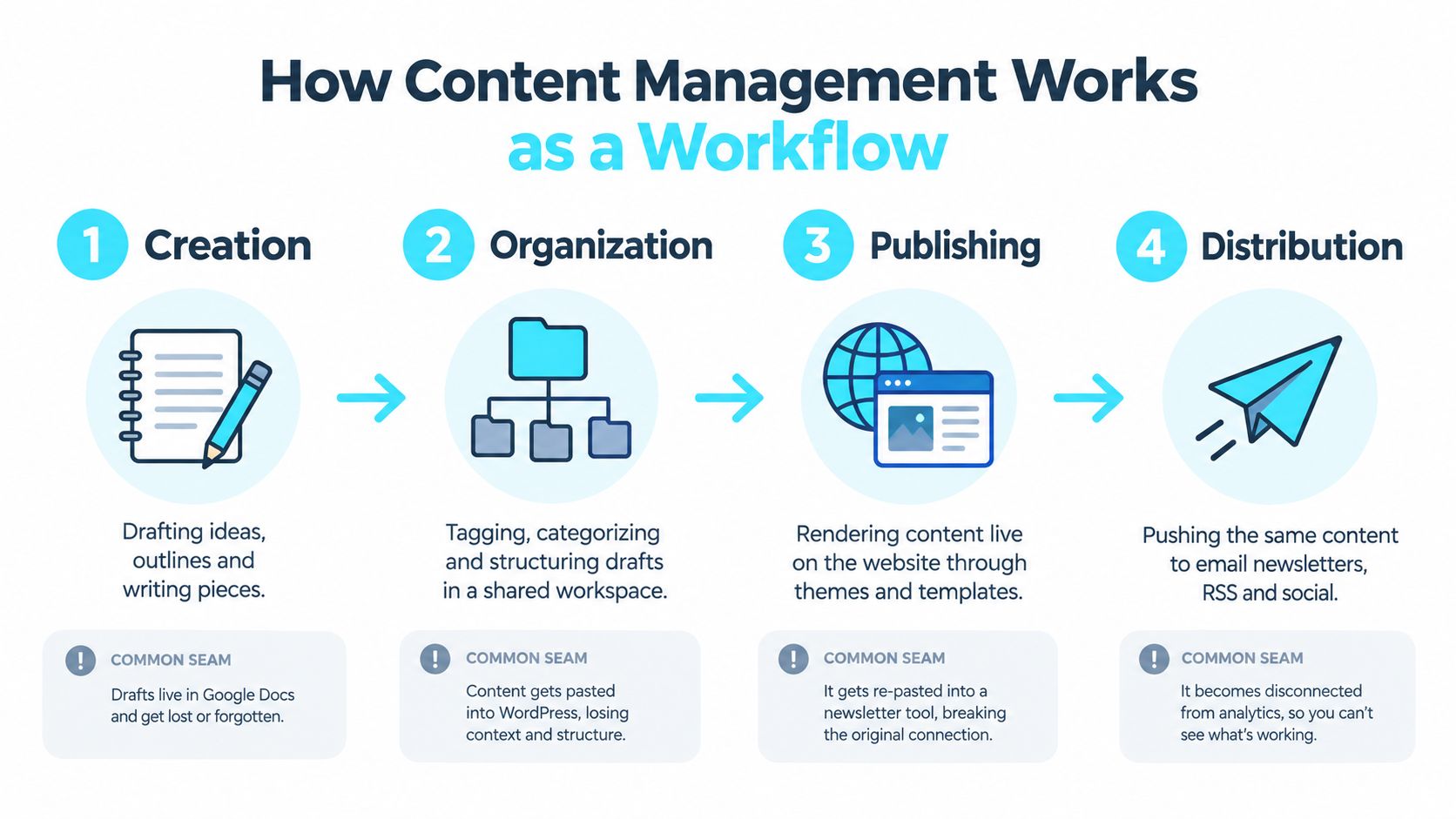
A useful way to think about content management is as a small magazine run through a kitchen pass. A writer brings in an idea, an editor organizes it, the site publishes it, and then the same piece gets sent outward to readers, search, and social channels. If any station on that line breaks, the whole order slows down.
Creation and organization
The first part of the workflow is creation, where a draft becomes something usable. That usually starts in an editor, then moves into structure, tagging, and review notes so other people can find and reuse it later.
The seam usually breaks when a draft lives in one place and the final copy lives somewhere else. A team writes in Google Docs, pastes into WordPress, copies again into an email tool, then wonders why headings, links, or summaries no longer match.
Publishing and distribution
Publishing is the moment the content becomes a live page with a template, metadata, images, and internal links. Distribution is the second half of the same job, because the same article often needs to become an email, an RSS item, a member update, or a social preview.
If the publishing tool and the newsletter tool don't share the same structure, the team ends up rebuilding the same piece twice. That creates errors in formatting, timing, and reporting, and it makes the archive hard to trust later.
A content workflow should reduce copying, not formalize it.
The best mental model is a pipeline, not a product. Once that becomes clear, the rest of the decision becomes easier, because each tool can be judged by where it sits in the path from idea to archived record.
The Four Building Blocks of Any Content Management Setup
A small team can buy three different tools and still miss the point. Content management works only when the setup handles the same four jobs every time, no matter whether the stack is hosted, self-managed, or consolidated.
Editor and content model
People create the content and decide what a piece is. A small team might draft in a block editor, use AI rewrite for cleanup, or add structured fields for author, excerpt, and category.
The key question is whether the content model preserves meaning. A post, a landing page, a newsletter issue, and a membership update should not all be squeezed into one messy text blob.
Storage and organization
This layer is the library behind the scenes. It stores drafts, categories, tags, media, revisions, post revisions and version history, and relationships between pieces so the team can find them later.
Teams lose control when media sits in one place, posts in another, and tags in a third. Every update turns into a scavenger hunt, and the person making the change spends more time searching than editing.
Publishing and rendering
Publishing turns structured content into a live page. Themes, templates, responsive layouts, and media handling all live here, along with the rules that decide how the page looks on desktop and mobile.
A good rendering layer keeps the page consistent without locking the team into one design forever. A weak one forces edits through code or turns every page into a one-off exception.
Distribution and audience tools
This is the outward-facing part of the system. It sends the same content to a newsletter, RSS, social previews, member areas, or partner channels without forcing a fresh rewrite.
If this layer is weak, the team re-enters the same article multiple times. Audience data, send history, and content performance then drift apart, which makes reporting harder to trust.
The simplest test is blunt. If a team cannot tell which block owns a problem, the stack is too fragmented.
How a Publishing Workflow Moves from Draft to Archive
A publishing workflow starts with a draft, but whether that draft can move through review, scheduling, distribution, and archive without extra cleanup is the true test. Small teams feel the friction most when each handoff lives in a different tool.
Draft, review, and approval
The editor is where the first decision gets made. Teams can use AI-assisted rewriting and SEO help during drafting, but a person still needs to check the facts, tone, and structure before anything goes live.
Role-based access matters here. A writer should be able to draft, an editor should approve, and an admin should control settings and final publishing rights.
Schedule, render, and distribute
Once content is approved, the schedule has to line up with the site template, schema output, and email send, see how to plan and schedule content in VeloCMS for how scheduled publishing and status tracking work. That alignment is easy to miss until a theme update or plugin change breaks markup or layout.
The World Bank's metadata guide, written for data catalogues, makes a point that carries over to publishing: metadata only works when it is machine-readable and consistent. If publication dates and authorship are inconsistent, search and indexing become less reliable, even when the page looks fine to a human. World Bank metadata guide
Archive and export
The archive matters more than many teams expect. If the system cannot export content cleanly, every migration turns into a rescue project.
WordPress documents this separation clearly in its export and import flow, where content can move through WXR XML while design and plugins stay behind, and media attachments need separate handling. That distinction is the lesson for small teams, because portable exports keep future tool changes from becoming disasters. WordPress export format and migration details, WordPress export and import lesson
Three Content Management Approaches Available to Small Teams
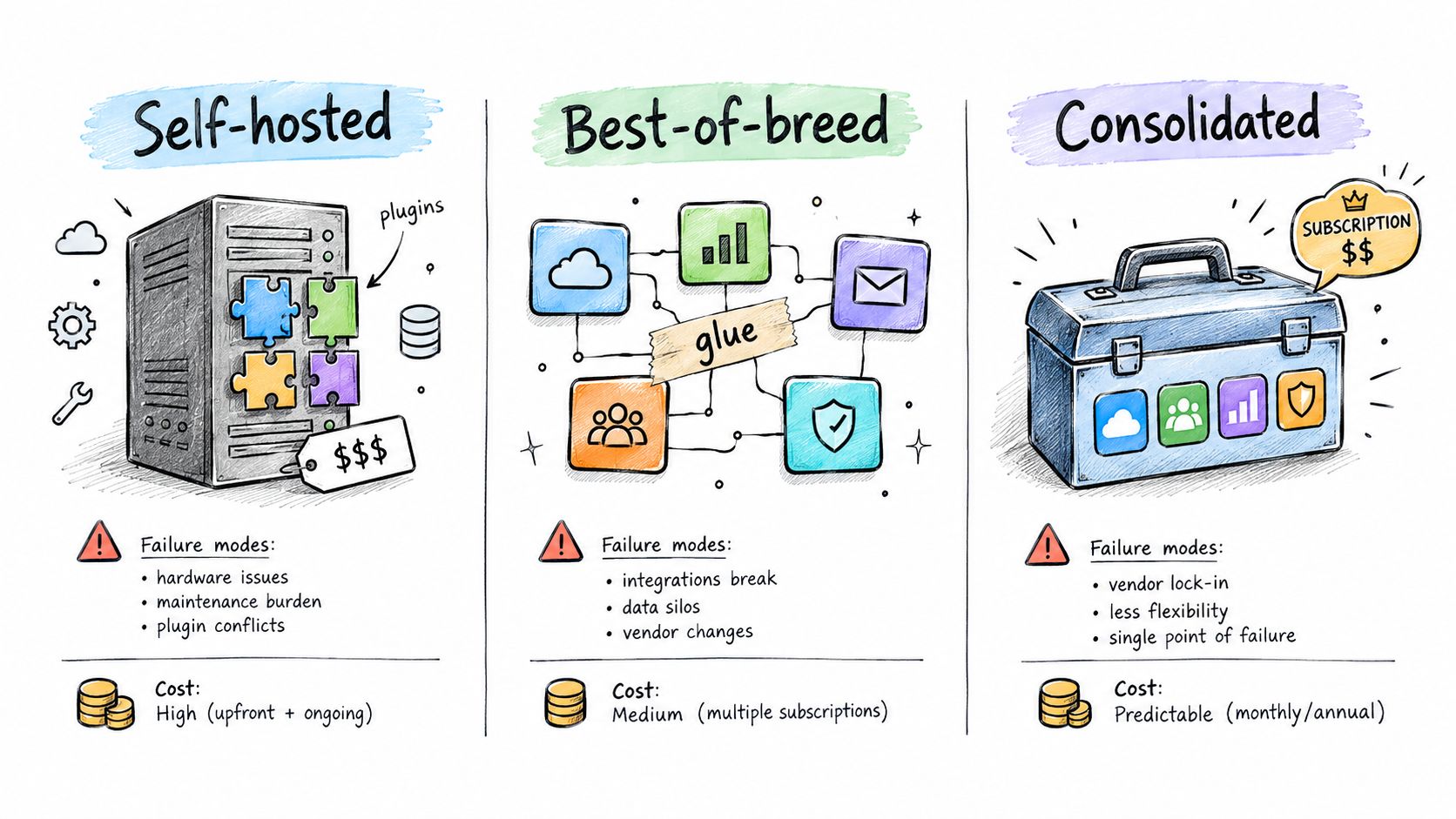
Small teams usually end up in one of three setups. Each one can work, but each one pushes the pain to a different place.
Self-hosted CMS plus separate tools
This is the classic stack, a CMS for the site, a separate email platform, a plugin layer for SEO or memberships, and maybe another tool for forms or analytics. It gives the team control, but it also creates the familiar plugin tax, meaning more updates, more compatibility checks, and more places where something can break.
The day-to-day upside is flexibility. The downside is that publishing lives inside a patchwork, so even simple changes can trigger a chain of edits across tools.
Best-of-breed tools stitched together
This setup uses one tool for writing, another for newsletters, another for forms, and another for the website. It can work well when each piece is strong, but only if the team has enough discipline to maintain every connector and enough patience to debug the handoffs.
The failure mode is fragmentation. Content may be accurate in one system and outdated in another, which is exactly how archives, subscriber data, and analytics drift apart.
Consolidated platform
A consolidated platform keeps the editor, themes, newsletter delivery, memberships, and integrations under one roof. VeloCMS fits here as one option, because it combines blogging, newsletters, memberships, and site theming in one subscription, with AI-assisted editing, native email delivery, and an integrations library.
The appeal is operational simplicity, not magic. The trade-off is that the team accepts one platform's workflow instead of assembling everything piece by piece, which can be the better bargain for small teams that value fewer moving parts over maximum customization. For a broader market view, SleekPost's small-business CMS buyer's guide is a useful companion read.
What to Look for When Choosing a Content Management Setup
The smartest way to choose a setup is to score the basics in order, not chase feature lists. Team size comes first, then publishing cadence, then money, then the risk of being trapped later.
Start with the team and the calendar
A solo creator can tolerate more manual work than a five-person publishing team. If multiple people need to draft, approve, and schedule content, the system should make roles obvious and revision history easy to check.
Publishing cadence matters too. MailerLite's 2025 benchmark of more than 3 million email campaigns reported a median unsubscribe rate of 0.22% industry-wide, compared with 0.08% in 2024, and MailerLite's separate cadence research found a 0.87% unsubscribe rate for accounts sending less than once per month, which suggests cadence is part of content management, not a separate marketing issue. Blog Herald summary of the MailerLite figures
Check the cost of glue work
A platform can look cheap until the team pays for extra plugins, separate newsletter software, automation tools, and the time needed to maintain them. That is the cost of a fragmented stack, and it usually shows up as recurring admin work instead of one clean invoice.
Revenue model matters as well. If the site sells memberships or paid content, commission fees and payment friction deserve as much attention as theme choice or editor quality.
Test performance, SEO, accessibility, and export
A setup should support real-user performance, structured metadata, and accessible publishing habits across web and email. Google's field guidance for Core Web Vitals treats Largest Contentful Paint as “good” when at least 75% of page loads reach the largest visible element within 2.5 seconds, so a CMS should make image handling, script loading, and template behavior easier to control, not harder. Google's Core Web Vitals guidance
The export question is just as important. If the platform can't give back portable content and audience data in a form that can travel, then the team is renting its archive, not owning it. The same thinking applies to accessibility, because content that is hard to read, hard to move through, or poorly labeled becomes a maintenance burden the moment it ships.
Putting It Together and Choosing What to Do This Week
Content management is a publishing-operations decision, not a software-purchase decision. The right setup is the one that matches team size, cadence, and revenue model with the least ongoing glue work.
This week, the team should map its current pipeline, list every tool that touches content, and mark every place where copy gets pasted more than once. Then it should run one post through a full workflow from draft to publish to email, because that reveals more than a demo ever will.
The next phase of content management will put more pressure on AI governance, accessibility as a real content-quality metric, and portable exports that preserve control when tools change. Teams that treat those as operating requirements, not nice-to-haves, will make better choices now and fewer emergency choices later.
VeloCMS brings blogging, newsletters, memberships, and site theming into one subscription, with AI-assisted editing, native email delivery, and integration support for small teams that want fewer moving parts. If that matches the way a site is run today, visit VeloCMS and see how the platform handles the publishing workflow end to end.